ClickCease

Why Choose a Headrest FM Transmitter for Your Car?

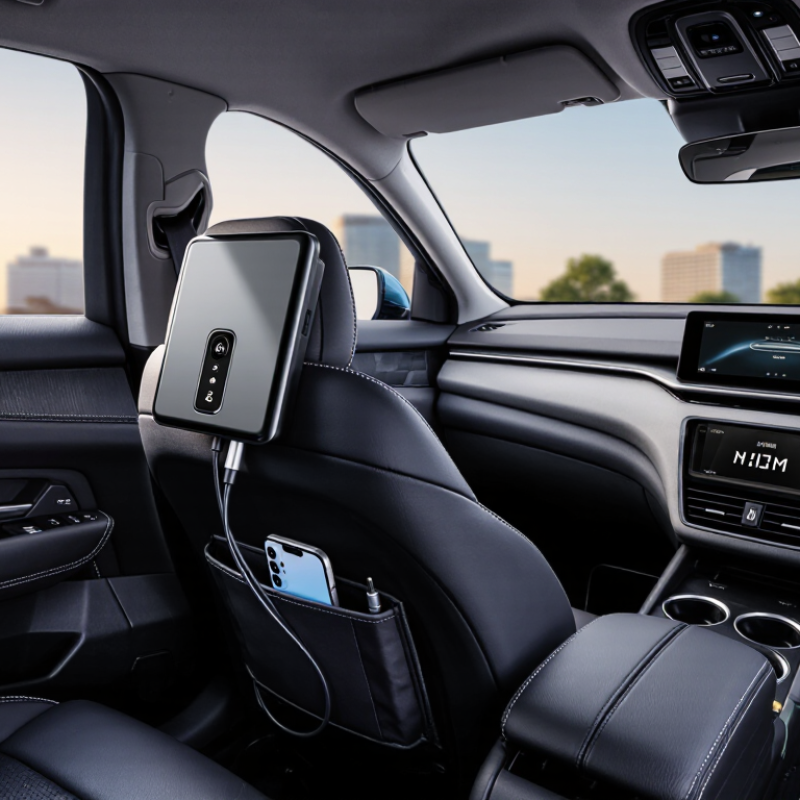
Choosing a headrest FM transmitter can make everyday driving more convenient without replacing the vehicle’s original audio system. A FM Transmitter Headrest typically sends audio from a compatible device to the car radio through a selected FM frequency. This design can support music, podcasts, and hands-free calls, depending on the model and vehicle setup. The headrest location may also keep controls visible and cables away from the driver’s hands.

In practical testing, placement makes a noticeable difference. A unit mounted securely near the headrest can feel cleaner than a loose dashboard accessory. However, performance depends on antenna design, local radio traffic, vehicle wiring, and transmitter power. It is not always perfect. Busy city areas may create static, volume changes, or brief interference. That limitation deserves attention before purchase.

A reliable choice should include clear pairing instructions, stable controls, and protection against overheating. Check whether its connector fits your phone, tablet, or charging system. Read the manufacturer’s specifications carefully. Independent reviews can reveal problems that product photos hide, such as weak buttons or poor microphone quality. Local radio-frequency requirements also vary, so use only settings permitted in your region.

Small details matter.

This guide examines why drivers choose a headrest FM transmitter, how it compares with built-in and wired options, and where expectations should remain realistic. It also considers sound quality, installation, comfort, and daily usability. A well-designed product can improve the cabin experience, but it cannot solve every audio problem.
Why Choose a Headrest FM Transmitter for Your Car?

What Is a Headrest FM Transmitter?

Why Choose a Headrest FM Transmitter for Your Car?

What Is a Headrest FM Transmitter?

A headrest FM transmitter is a small audio bridge fitted near a vehicle’s headrest. It receives sound from a phone, tablet, or rear-seat media system. Then, it sends that sound through a low-power FM frequency. Your car radio receives the signal like a local broadcast.

This setup can make rear-seat audio easier to share. Passengers hear navigation prompts, stories, or music through the vehicle’s speakers. It also avoids extra cables crossing the center console. Nielsen’s 2024 Audio Today report shows AM/FM radio still reaches more than four in five U.S. adults weekly. RAJAR’s Q4 2024 report recorded 88% weekly radio reach among UK adults. These figures explain why FM remains useful inside cars, even with newer wireless systems.

The experience is not always perfect. Nearby stations may create static, especially in crowded urban areas. Audio can also sound quieter than a direct Bluetooth connection. A headrest position may improve access, but it does not guarantee stronger transmission.

Tips: Choose an unused frequency and test it while driving safely. Keep the transmitter away from metal obstructions. Check local radio regulations before installation. In the United States, low-power devices must follow FCC Part 15 requirements. A clear signal matters more than impressive feature lists.

Why Choose a Headrest FM Transmitter for Your Car?

A headrest FM transmitter sends audio from a headrest entertainment system or another device through a short-range FM signal, allowing the car’s built-in radio to play the sound without an AUX cable or factory media integration.

The chart compares the published FM broadcast-band span in selected regions. A transmitter must operate within the FM frequencies supported by the vehicle and local regulations, so broad regional compatibility is an important consideration.

How Does a Headrest FM Transmitter Work?

Why Choose a Headrest FM Transmitter for Your Car?

How Does a Headrest FM Transmitter Work?

A headrest FM transmitter sends audio from a connected device to the car’s radio. It converts digital or wired audio into a low-power FM radio signal. The car stereo receives that signal on a selected frequency. Tune both devices to the same clear channel, and the sound plays through the vehicle speakers.

The transmitter usually sits near the headrest, keeping the signal path short. This placement can support rear-seat entertainment without running long audio cables across the cabin. During setup, I would check the radio band for static before choosing a frequency. Nearby stations, tunnels, and dense city areas may cause interference. The sound can also lose clarity if the transmitter volume is too high. It is not perfect.

Tips: Choose an unused FM frequency, then set the transmitter volume moderately. Keep the device secure near the headrest, away from airbags and moving seat parts. Test it while parked. A short listening check can reveal buzzing, weak reception, or delayed audio. Also, remember that vehicle radios differ, so one frequency may not work equally well everywhere.

What Features Should You Consider Before Choosing One?

Choosing a headrest FM transmitter starts with fit, not flashy specifications. In my car, a secure mount matters when roads become uneven. Look for adjustable straps or a stable bracket that does not block the driver’s view. The controls should be reachable by a passenger, not the person driving. Keep it simple. Check whether the transmitter works with your phone, tablet, and vehicle radio. Bluetooth is convenient, but wired input helps when pairing becomes unreliable. Some devices support USB playback, though file compatibility may vary.

Audio performance depends heavily on frequency selection. Choose a model with a broad, easy-to-scan FM range and a clear display. Automatic scanning saves time, but manual tuning helps in crowded areas. Test several frequencies near your usual routes. A quiet parking lot can be misleading. Static may appear beside strong local stations. Adjustable transmission power and memory presets can improve daily use, where legally permitted. Sound should remain balanced at moderate volume, without harsh hiss during quiet dialogue.

Power and heat deserve attention. A long cable should reach the socket without crossing the steering area. Look for overload protection, ventilation, and a visible charging indicator. If children sit behind the headrest, rounded edges and a secure enclosure are practical details. Read the electrical specifications carefully, especially input voltage and charging output. I would also verify local radio requirements before regular use. One overlooked issue is microphone privacy, if the unit includes hands-free calling. Disable unused functions. No device is perfect; interference can still occur, and my first frequency choice is not always the best. Reliable support, clear instructions, and a reasonable return policy make testing less risky.

Why Choose a Headrest FM Transmitter for Your Car? - What Features Should You Consider Before Choosing One?

Feature Dimension Recommended Specification Why It Matters What to Check Before Buying
Wireless Audio Connection Bluetooth 5.0 or newer Provides a stable connection for music, podcasts, and hands-free calls while generally using less power than older Bluetooth versions. Confirm compatibility with the phone operating system and check whether automatic reconnection is supported.
FM Frequency Selection A broad selectable range, commonly around 87.5–108.0 MHz Allows the transmitter to use a less crowded local frequency and reduce interference. Look for easy tuning, clear frequency display, and access to multiple memory presets.
Audio Quality Low-noise transmission with adjustable volume and balanced sound A good signal helps minimize static, buzzing, and noticeable volume differences between songs and calls. Test several unused frequencies and keep the transmitter close to the vehicle’s FM antenna when possible.
Headrest Compatibility Adjustable mounting system compatible with common headrest-post spacing A secure fit prevents movement, protects passengers, and keeps controls or displays within reach. Measure the headrest posts, verify the clamp width, and check whether the mount supports tilt adjustment.
Power Input 12 V vehicle power input with a USB charging output Supports continuous operation and can help keep a phone or media device charged during long trips. Check the output rating, connector type, cable length, and whether the vehicle socket remains powered after the engine is switched off.
Hands-Free Calling Built-in microphone with answer, end-call, and reject-call controls Makes calls more convenient while reducing the need to handle a phone while driving. Check microphone placement, echo reduction, call-control compatibility, and local driving regulations.
Playback Controls Large, clearly marked buttons for play, pause, track selection, and volume Simple controls help passengers manage entertainment without repeatedly reaching for a phone. Prefer tactile buttons, readable labels, and controls positioned away from the driver’s main viewing area.
Input Options Bluetooth plus USB, microSD, or 3.5 mm auxiliary input Multiple sources improve flexibility when a device has limited wireless capability or a low battery. Confirm supported file formats, storage capacity limits, and whether the auxiliary port is input or output.
Display and Visibility High-contrast display with adjustable brightness A readable display makes frequency changes and status checks easier in different lighting conditions. Check readability from the front seats and choose a model that avoids excessive glare at night.
Safety and Operation Secure installation, short controls, and minimal driver distraction A headrest-mounted device should improve passenger convenience without obstructing visibility or interfering with airbags. Keep the unit clear of side-impact airbag deployment zones and follow the vehicle and accessory installation instructions.
Installation and Portability Tool-free installation with a removable or foldable design Makes it easier to move the unit between vehicles or remove it when the car is unattended. Inspect clamp strength, cable routing, locking mechanisms, and the amount of space needed behind the headrest.
Best Use Case Passenger entertainment, older vehicles, and cars without built-in Bluetooth Offers a practical way to add wireless audio and charging without replacing the vehicle’s original stereo. Choose another solution if the car already has reliable wireless audio, integrated controls, or a factory infotainment system that meets your needs.

Note: Frequency availability, vehicle compatibility, audio quality, and installation requirements may vary by region, vehicle design, and local radio conditions.

What Are the Main Benefits for Car Entertainment?

A headrest FM transmitter can make ordinary car journeys feel more organized. It sends audio from a rear-seat device through the vehicle’s FM radio. Passengers can hear music, podcasts, or travel programs without crowding around one small speaker. The headrest position also keeps entertainment equipment at eye level. This feels more comfortable during long drives. In my experience, children stay engaged longer when sound is clear and controls are easy to reach. Parents can keep the front cabin quieter, too.

The main benefit is shared entertainment without complicated installation. Most units fit around a headrest and use the car’s existing audio system. They usually avoid loose cables across the seats. That makes the cabin look cleaner and reduces distractions. However, performance depends on the transmitter’s signal and local radio interference. It is not flawless. A weak frequency can produce static, especially near busy roads. Drivers should set the channel and volume before moving, then leave adjustments to a passenger.

Tips:

Choose an unused FM frequency before each trip. Test the sound while parked. Keep the volume moderate, since loud audio can hide horns or emergency sounds. Check the headrest fit carefully. A stable mount prevents shaking over speed bumps. Clean the transmitter connection if the audio cuts out. Some vehicles may need a different power adapter, so check compatibility before purchase.

How Can You Install and Use It Safely?

Why Choose a Headrest FM Transmitter for Your Car?

A headrest FM transmitter can add convenient audio control without complicated dashboard wiring. It sends sound to the vehicle radio through a selected FM frequency. Installation should begin with the vehicle parked and the engine switched off. Check that the headrest posts support the mounting bracket firmly. The unit must not block the driver’s rear view, mirror adjustment, or access to safety equipment. I once fitted a device too close to the seat release button. It worked, but the position was poorly considered.

Tips: Read both instruction manuals before connecting anything. Adjust the bracket until it feels stable, not merely tight. Keep cables away from pedals, hinges, and sliding seat rails. Use a clear FM frequency with minimal static. Test the sound at a low volume while parked. A loose cable can become distracting during movement. Small details matter.

After installation, pair the audio source according to the device instructions. Select the same frequency on the transmitter and car radio. Keep the transmitter volume moderate, then fine-tune the radio volume. Avoid changing settings while driving. If interference appears, stop safely and select another permitted frequency. Never cover ventilation openings or place the unit near excessive heat. Recheck the mount after several journeys, especially on rough roads. It may seem secure at first, but vibration can reveal weaknesses.